
Drone footage sharing is here inBETA. Share a Mirada case, complete with every photo, video, 360 capture, Eagle Eyes detection, and all the map data, providing secure access to exactly who you choose. This release also lets you load a Google Drive folder straight into Mirada, and runs the Eagle Eyes detector on 360 photos and 360 video.


Detections includedYour Eagle Eyes detections are shared with the case.
Free to viewViewers open the case for free, in either app.
Mirada Data (Drone Footage) Sharing BETA
How many times have you seen drone footage collected, only to languish on SD cards, never to be seen again? In this Mirada release, we are making it easy to get more sets of eyes on your drone footage with case sharing. Sharing is optional and always in your control.
A Mirada case is the drone side of one incident or operation. It is a shared space for everything the drones on that operation see and gather, from your team and from any team you bring in. The footage, the Eagle Eyes detections, the flight tracks and the map data all live in the case. What is new is that a case can now be shared with everyone around you. Your whole team, teams supporting through mutual aid, remote command posts, and anyone else you choose to bring in.
Sharing works the way you already know from Google Drive or CalTopo. Sending a share link takes seconds, and you stay in complete control of who has access. Invite specific people by email address, or create a public link that anyone can open. The case opens in Mirada web, or in Mirada desktop if they have it. Viewing is free, with no paid Eagle Eyes license needed, for as many people as you choose to share with. Viewers can also download the data to their own drive at any time.
No more upload and download marathons. Today, sharing drone footage usually means a slow upload to Google Drive or OneDrive, sending a link, and a painful download on the other end. What arrives is a pile of zipped folders that is hard to make sense of. Mirada removes all of that. Pick some or all of your footage and click "Share", and it uploads into a shared Mirada case. Whoever you send it to clicks the link and the case opens straight away, from anywhere in the world, organized the way you set it up.
This opens the door to true remote support for drone search operations. On a search, a supporter can be anywhere in the world and still work with the footage you choose to share. They can watch the operation live, with every drone moving on the map. They can sift through detections, bookmark anything of interest, and connect to CalTopo. They become the human in the loop, from home.
On many searches, drone footage piles up faster than the people on scene can review it, while willing volunteers elsewhere have no way to help. Shared Mirada cases let those people contribute. You stay in control the whole way, choosing what goes into the case and who sees it. Run the Eagle Eyes detector on your footage, then share the case with all of your drone footage and its Eagle Eyes detections. Remote supporters work through them and bookmark what matters, and their bookmarks can go straight onto the incident's CalTopo map as photo points. They can also generate a report that sums up every clue and notable detection they found.
This is the first release of shared cases. For now, only the case owner can add drone data to a case. Everyone they share it with can view all of the footage and detections, and download it to their own drive. Truly collaborative cases, where several people add data to the same shared case, are coming soon.
Every account starts with USD $5 of free credit. Free accounts included. Sharing a case is USD $2.00 for up to 10 GB, and USD $0.20 per GB for anything bigger, so a 30 GB case is USD $6.00. That first USD $5 covers two shares of up to 10 GB each. Each share stays live for one month.
Every account getsincluding free accounts
What each share costs
Shared cases and their links expire after one month.
Recipients can download the case data to their own drive at any time, and keep viewing it locally in Mirada, free.
Sharing today, long-term storage next. Case sharing is built for getting data to your team during and right after an operation, so cases and their links expire after a month. Recipients can download the data at any time and keep viewing it locally in Mirada, free. Next comes long-term encrypted cloud storage for your drone footage, and we are building it right, with security and privacy in from day one.
Much of Mirada is free to use
As we roll out the early version of Mirada and hear your feedback, we are making a significant amount of its functionality free to use, and we intend to keep much of it free. The people you share cases with, livestream your drone feed to, and coordinate alongside in multi-drone operations can all take part in your shared picture of the airspace and the drone data, without needing to pay for access.
FREEfor everyone

Mobile app coming soon.
- Store and organize your drone footage
- Google Drive folders. Load a Drive folder link straight into Mirada, then view and organize your drone footage
- Case sharing. Every account starts with USD $5 of free credit, enough for two shares of up to 10 GB each
- View live drone locations tracked into Mirada
- RID receiver integration. View and display Remote ID detections in Mirada
- Live multi-drone coordination during operations, and airspace deconfliction
- Access airspace layers
- Pre-flight and mission planning
We want the core of Eagle Eyes in the hands of every team that needs it. So these are free, for everyone.
Load a Google Drive folder straight into Mirada 
Paste a Google Drive folder link with drone footage in it straight into Mirada.
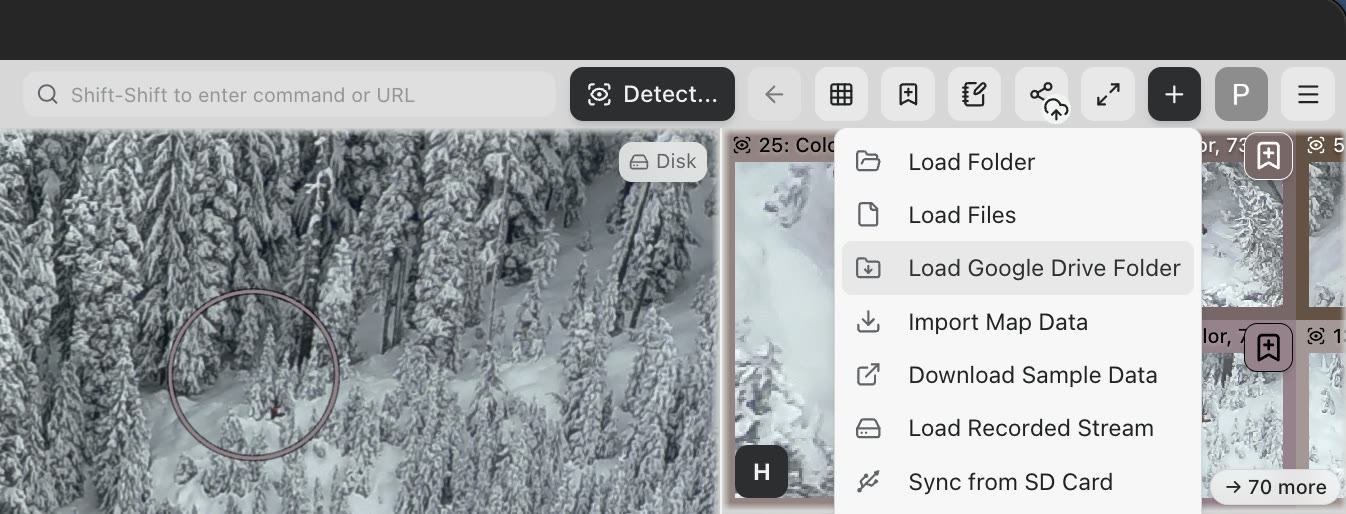
Mirada scans the folder first and tells you how many files and gigabytes it holds. When you are ready, everything loads into your Mirada case and is organized like any other case, chronologically and by media type. It is geolocated on the map, ready to view, run the Eagle Eyes detector on, and share.
Import the same Google Drive folder again after more footage has been added to it, and Mirada loads only the new files. Anything already loaded into your case is not duplicated.
You don't need to sign in to Google Drive to load a folder. Just set the folder's sharing to "Anyone with the link". Mirada copies the files from the folder into your Mirada case, and everything in your Google Drive folder is left exactly as it is. Your data stays on your Google Drive and on your own machine unless you choose to share it.
Mirada desktop only for now.
-
Copy the link to our sample Google Drive folder, drone photos from the Summer Lake search.
https://drive.google.com/drive/folders/1P4pkQtwT42T5Mcbd9448UqbxxrT1m0oE?usp=sharing - Open Mirada desktop. Get Mirada desktop
- Paste the link into the search bar at the top of Mirada, or click the + button and choose "Load Google Drive Folder".
Run the Eagle Eyes detector on 360 photos
A 360 photosphere is not one image, it is roughly 25 still photos stitched together. Mirada runs the Eagle Eyes detector on each of those source photos separately, at their own resolution, so nothing is lost to the stitch.
To capture one, tap the photo point button  in Eagle Eyes Pilot in Full Piloting Mode, and choose the 360 pano option.
Bringing 360 photos into Mirada? Import the source photos along with the stitched 360 pano image. DJI usually keeps the source photos in their own folder on the SD card, often named PANORAMA, separate from the stitched pano. Upload the complete set and Mirada groups them automatically. Without the source photos there is nothing for the Eagle Eyes detector to run on.
Explore this one yourself
This is a real capture: a 360 pano from Eagle Eyes Pilot, with the Eagle Eyes detector run on its source photos in Mirada. Open the demo to pan around the sphere, turn on the detections, and see each one on the full-resolution photo it was found in.
Open the 360 detection demo Pan, zoom and open every detectionRun the Eagle Eyes detector on 360 video ALPHA - Early Release
360 video works differently. Mirada splits each frame into about nine segments and runs the Eagle Eyes detector on them, sampling one frame per second. That sampling rate is what the detector uses, not what you watch.
For 360 video, detections show in the mosaic view and are plotted at their estimated location on the map, so you can search for anomalies across the entire 360 degrees.
We are calling 360° video an Alpha release for good reason. The viewing experience is still choppy, and we are actively refining both the viewer and the way the Eagle Eyes detector runs on the 360 video. We are excited about where this goes, so tell us what you hit.
Reporting a problem is now easy
A big shout out to everyone reporting bugs and sending feedback. Thank you. It helps us move much faster than we could on our own, and it keeps making Eagle Eyes more useful for everyone. We want giving it to be as easy as possible.
So we have taken the friction out of reporting a problem. In Mirada, on desktop or web, open the menu and choose "Report to the Eagle Eyes team", then "Report a problem". Show us exactly what went wrong, and optionally include the app logs, which show us what was happening behind the scenes when it did. With everything we need in one report, we can fix problems much faster and get the fix back to you, and to everyone else.
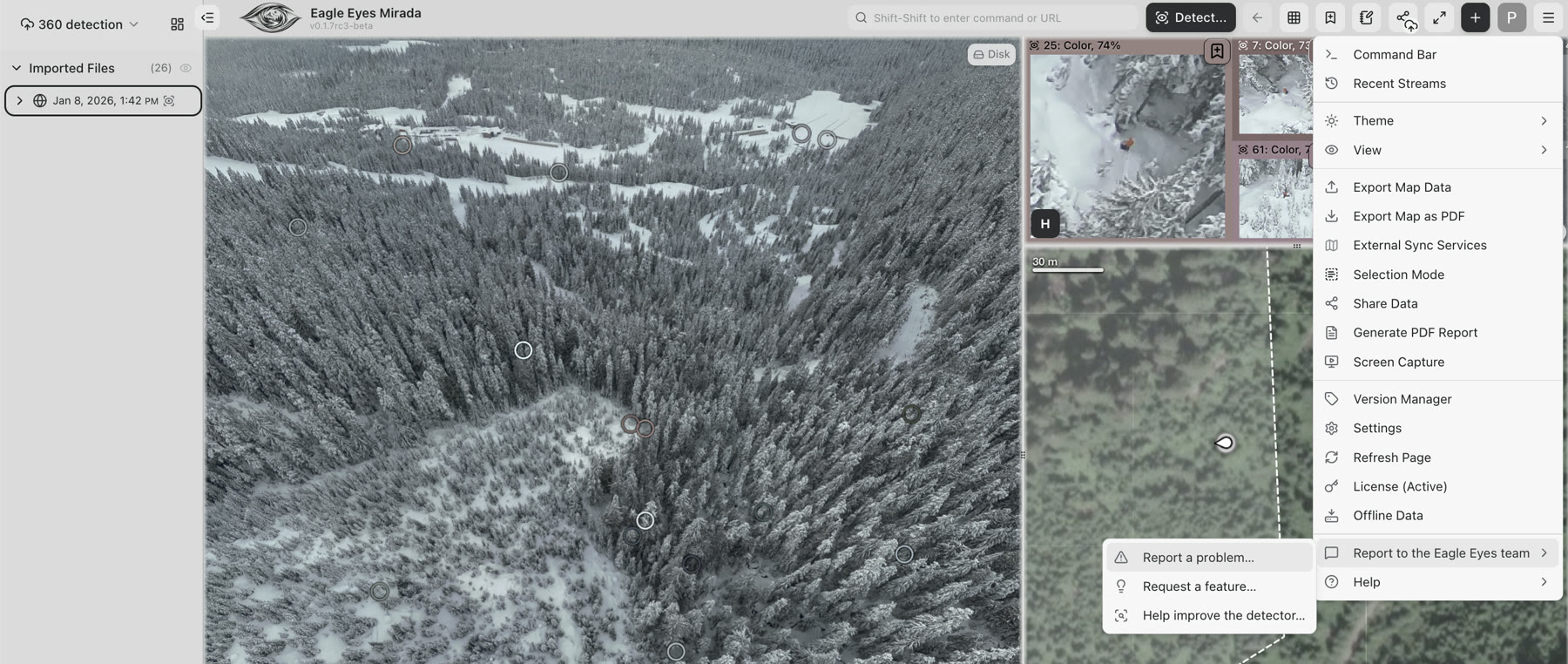
The same menu also lets you request a feature, and send us photos or video to help improve the Eagle Eyes detector. Footage where the detector did well, or where it fell short, is particularly useful to us, and sharing it with us is now much more streamlined.
Please keep the bug reports, comments and suggestions coming.
Plenty more
- Mirada runs smoother. A number of you told us Mirada was slowing your machine down. We have put real work into optimizing it, especially on lighter laptops. Tell us how it runs for you now.
- More for live operations and planning. We have continued adding to live operations, pre-flight planning, mapping, and map situational awareness.
- Improved 3D map. Substantially smoother than before. Still under active development, so expect it to keep improving.
- A lot of bug fixes. Significant work has gone into stability and fixes across Mirada this cycle.
There is a lot more coming. We have new features and capabilities lined up that we are genuinely excited about, landing soon, alongside a steady stream of smaller improvements across the app.
Sign up for our newsletter to get notified about new features and releases, and other news from the Eagle Eyes team, such as live webinars and announcements.
Thank you for your continued feedback and trust, and for doing the work that you do.
The Eagle Eyes Team
27 September 2026
Get Eagle Eyes Mirada 0.1.7
Would you like to download the desktop app, or open the web app?
27 September 2026, by Eagle Eyes Team